Plugboard pulls sources from every audio interface in your rack — plus Dante,
other apps' audio, and its own signal generators — and lets you solo, group, sum, or duck them
into listen mixes, sent to as many outputs as the show needs.
Each interface keeps its own clock·Zero external dependencies·Native Core Audio HAL
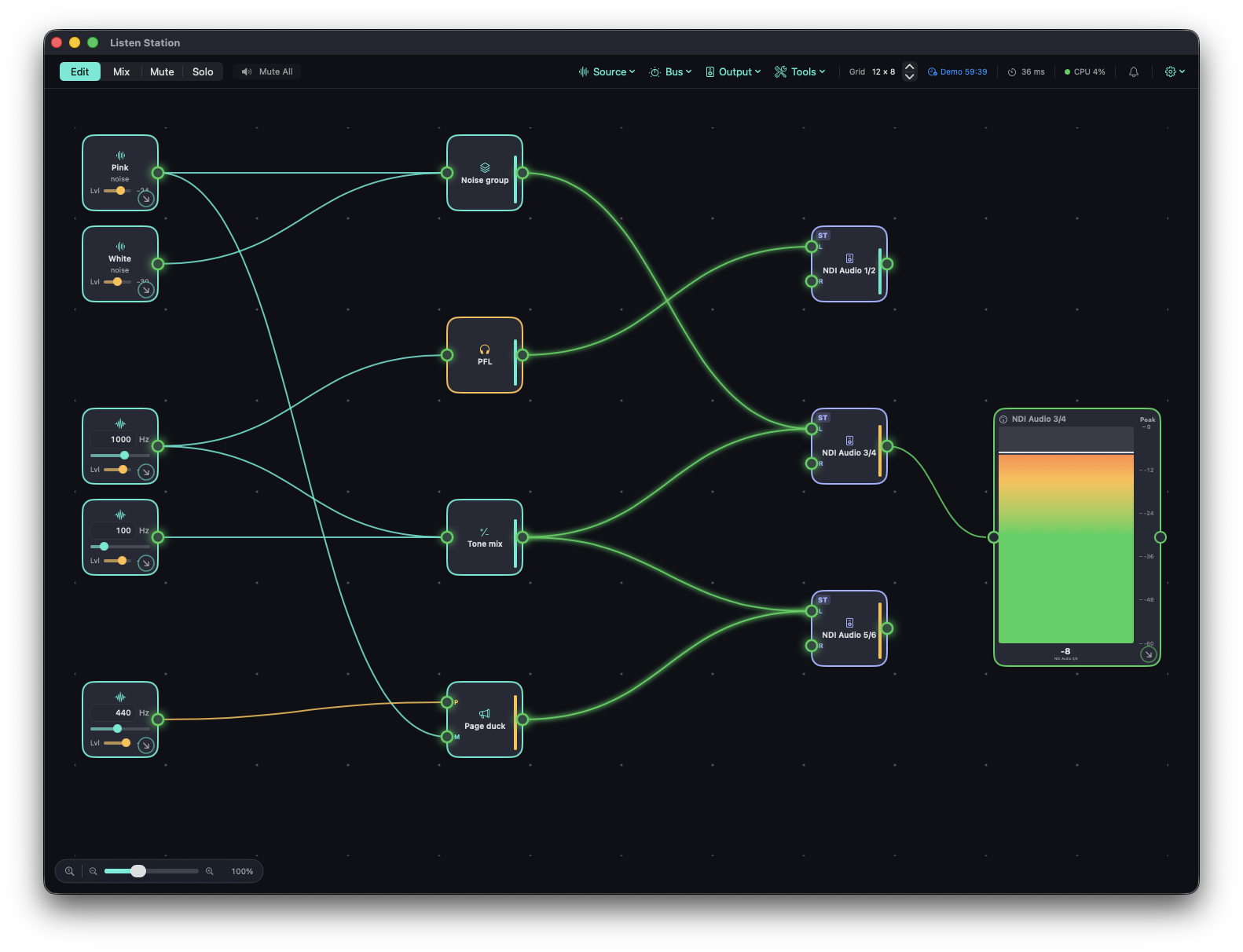
The real app, not a mock-up: sources, buses and outputs are tiles you place free-form on a snap grid, and the wires light up with live level. Staged with Plugboard's own signal generators and a silent virtual NDI output, so nothing is audible. Click for the full-size capture.
Built for
Broadcast & event control rooms
Listen to IFB, comms, or program off a rack of interfaces without patching a single cable.
Live sound & monitor world
Solo any input off FOH or monitor-world interfaces before it ever hits a mix.
Worship & campus AV
One listen station across a booth's separate interfaces — board, streaming rig, overflow room.
Post & studio
Confidence-monitor whatever's plugged into whichever interface, with no re-patching.
Multi-room venues
Sum or solo feeds from interfaces in different rooms into a single listen mix.
Dante & remote setups
Pull network audio and other apps' output into the same listen mixes as your local rack.
The model
Sources → Buses → Outputs.
Every device in the rack is a pool of sources. Every listen mix is a bus. A bus can feed as many
outputs as you route it to — one soloed channel can land on your headphones and a stream monitor
at the same time.
Sources
Any channel, any interfacedevice UID + channel, opened independently
Headphones / IEMone or more channels, one interface
Many outputs, one busfan a single mix out everywhere
Monitor over the LANa live page in any browser
Sources
Everything in the rack is fair game.
A source is a channel on a device — or a whole interface, or a channel that isn't hardware at all.
Each one is a tile you drag onto a bus.
Any channel, on any interface
Bind to a device UID + channel. Every interface opens independently — no macOS Aggregate Device, so no shared clock domain to fight.
Stereo pairs & whole interfaces
Drag-select a range of ports to grab a stereo pair, or pull in an entire interface as one multi-channel source tile.
Dante network audio
Patch any transmitter's channel straight off the network — not limited to one dedicated Dante tile per source.
Other apps' audio
Capture another running app's output as a source tile — a process tap, no virtual audio cable required.
Signal generators
Sine at a typed exact frequency, pink noise, or white noise — a line check without extra gear.
SinePinkWhite
Hot-plug aware
Unplug an interface and its sources show an offline badge and drop out cleanly. Replug it and everything reattaches, bound by device UID.
Buses
Four ways to build a listen mix.
A bus is a destination, not a device. Give it a kind, add members, and route it to as many outputs
as the moment calls for.
Solo
PFL, one at a time
A named solo bus monitors a single source at once — tap a different source and it replaces the last. Run as many solo buses as you need, each routed to its own output.
Group
A named set
Add or remove sources from a group freely. Useful for "everything in booth 2" or "every wireless" as one switchable listen point.
Sum
A unity mix
Every member sums in at unity — a clean, predictable mix with no per-member trims to lose track of mid-show.
Priority mixer
Ducks automatically
A priority input — talkback, a page, a cue — attenuates a group or mix while it's active, fading in over an attack time, holding, then releasing back on its own.
Metering & analysis
Every scale, every analyzer, on any tile.
Meters and analyzers are tiles, same as everything else — drop one on a source, a bus, or an output,
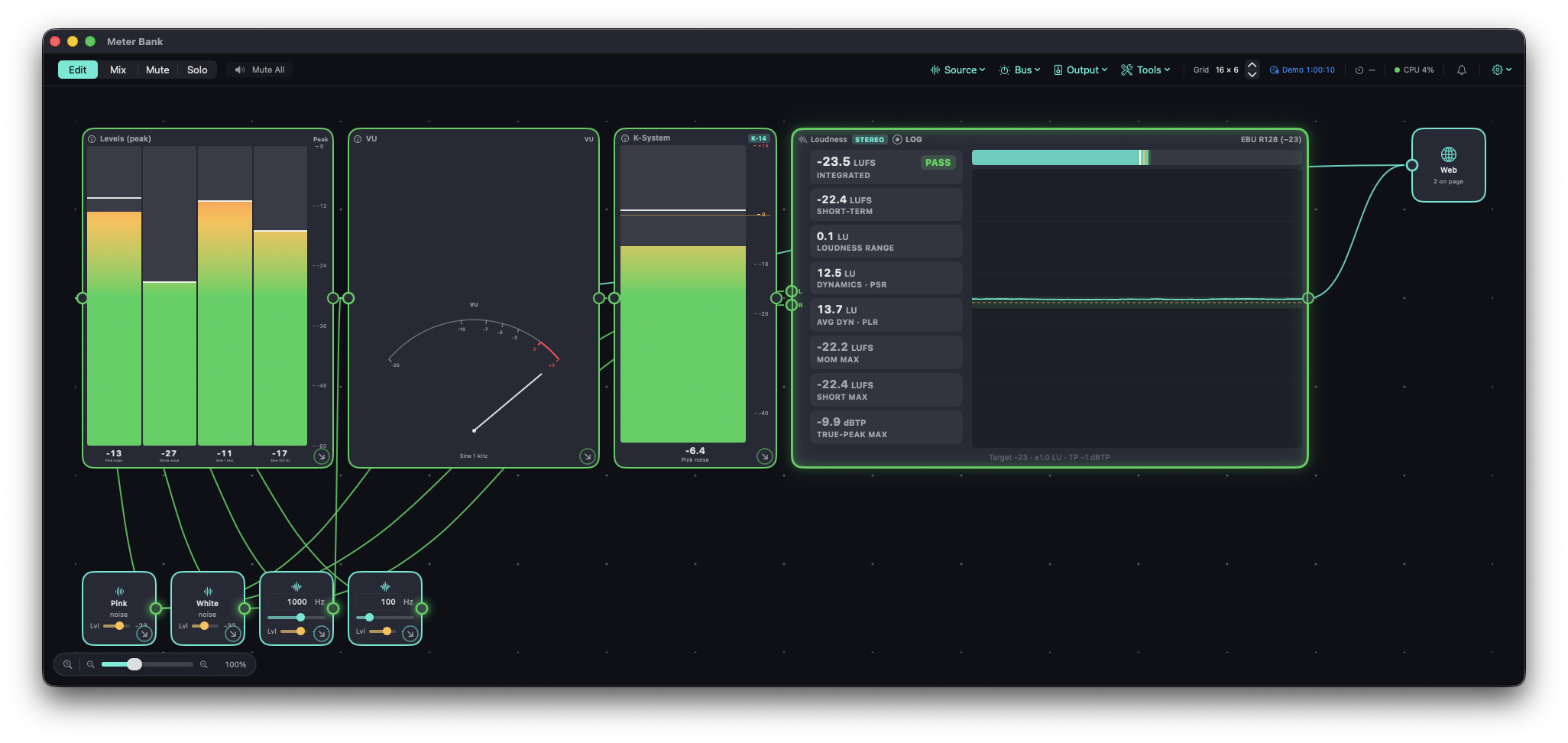
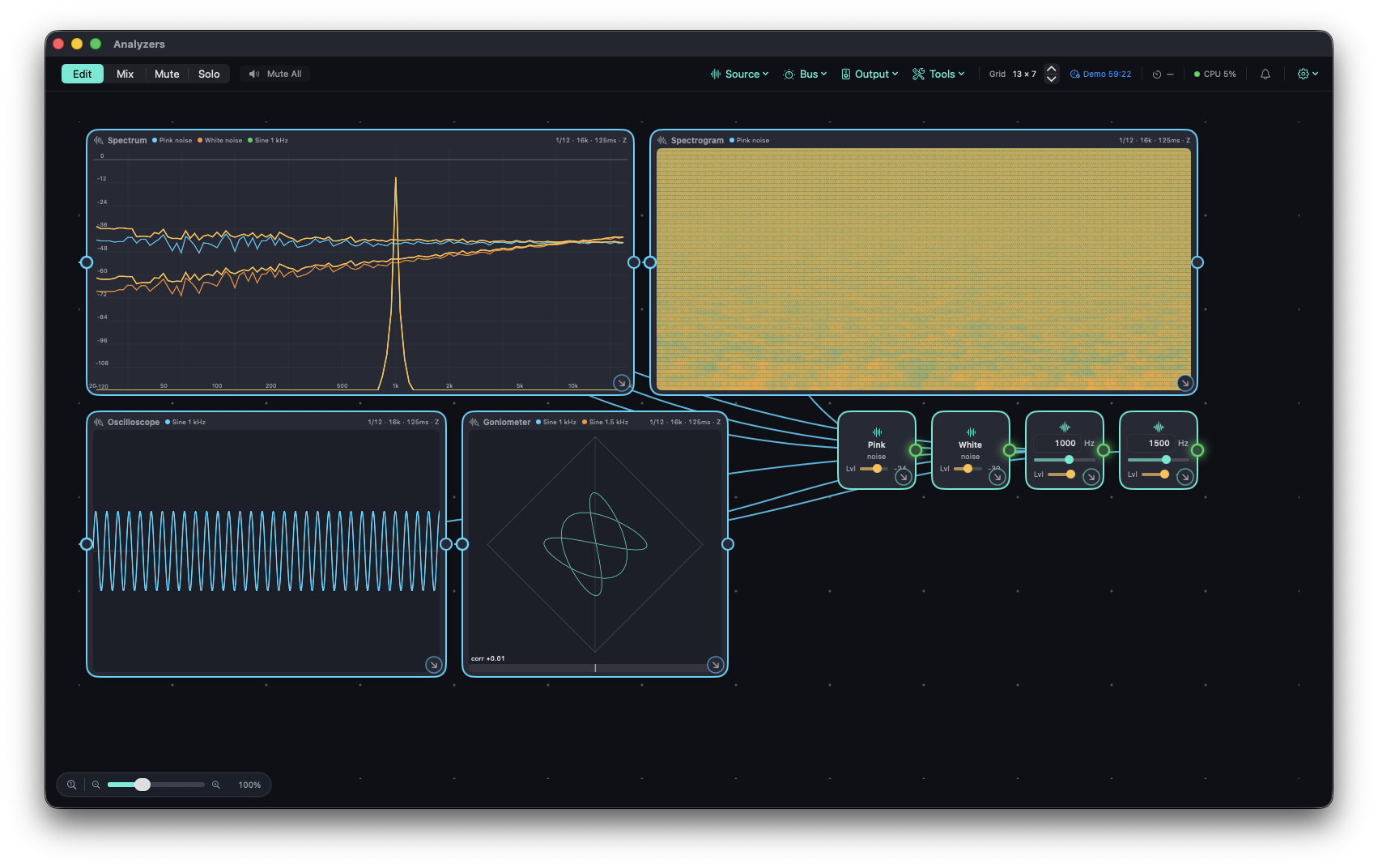
and it reads that exact point in the signal path. These are the real tiles, running:
Real meter tiles: peak bars, a VU face, a K-System meter, and the EBU R128 loudness panel (integrated, short-term, range and true-peak readouts, with a PASS verdict against the −23 LUFS target). Staged with the app's signal generators: two noise sources and two sine tones.Real analyzer tiles: a 1/12-octave spectrum with three overlaid traces (pink noise, white noise, a 1 kHz sine), a spectrogram of the pink noise, an oscilloscope, and a goniometer fed by 1 kHz and 1.5 kHz sines — hence the Lissajous figure rather than a natural stereo image.
Peak, dBu & VU
Live peak on every source, bus, and output tile — not just the ones you're actively soloing. Switch the scale per-meter between dBFS, dBu, and a classic VU ballistic.
Momentary & short-term LUFS
K-weighted loudness per EBU R128 — momentary (400 ms) and short-term (3 s) — so you can watch level move in real time, not just after the fact.
Integrated LUFS & true peak
Gated integrated program loudness plus a 4×-oversampled true-peak max — restart the measurement whenever the program does, so the number maps to something you can defend.
RTA spectrum
A real-time spectrum analyzer in fractional-octave bands on any tile — calibrated so full-scale pink noise reads flat.
Oscilloscope & goniometer
Waveform for transients and clipping, phase/stereo image on the goniometer — the two views engineers actually reach for before trusting a fader move.
Spectrogram
Frequency content over time, for chasing down a hum, a feedback ring, or an intermittent noise you can't quite place by ear.
Timecode reader
Decode LTC off any input channel and read it right on the canvas alongside your meters — no separate timecode window.
Route a meter to any tile
Meters and analyzers patch in exactly like a bus does — as many as you want, on as many sources, buses, or outputs as you're tracking.
Monitor anywhere
Your meters, live, in a browser on the LAN.
Plugboard runs a tiny built-in
web server that publishes the meters, analyzers and sources you wire into a Web tile as a live page —
so anyone on the network can check levels from a phone or laptop without touching the Mac running it.
You choose what's published. Wire meters, analyzers or sources into a Web tile and arrange the page in its editor — it's laid out separately from the canvas.
Live meters. Peak, loudness and RTA data stream to the browser as the show runs.
Light remote control. Sources and buses on the page get Mute and Solo buttons; everything else is view-only.
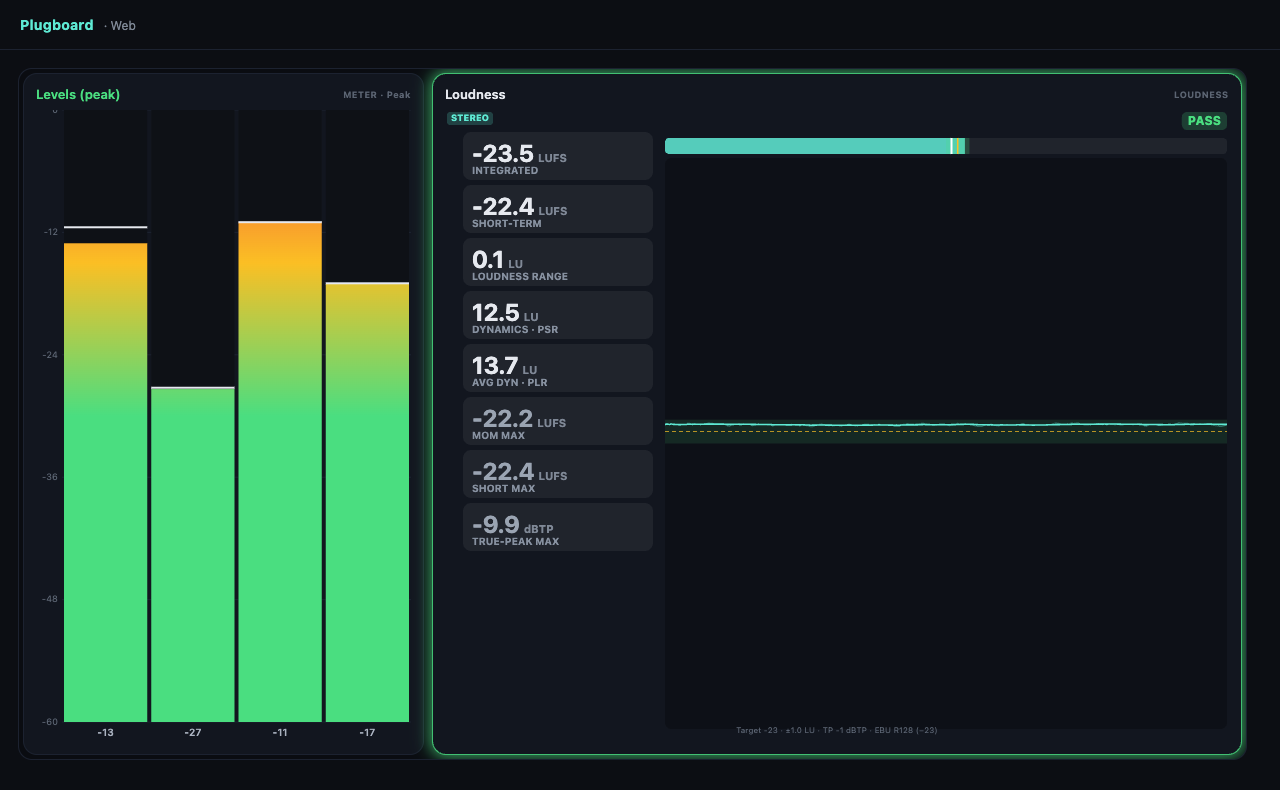
The built-in web page, captured in a browser: a Levels meter and the EBU R128 loudness panel, published from a Web tile in the staged patch.
Built to hold up
Boring, on purpose, where it counts.
The routing model and the real-time mix math are pure and unit-tested; the risky parts — device I/O,
clock drift — are proven against real hardware before they touch the app.
Independent clocks
Each interface opens on its own — no macOS Aggregate Device — so one device's clock never has to agree with another's.
Drift-corrected
A resampler trims each source against the target rate continuously, so nothing overruns or underruns over a long show.
Lock-free rings
A wait-free single-producer/single-consumer ring buffer is the only boundary between an audio callback and the mix engine.
Honest diagnostics
A missing device or an out-of-range channel shows up as a diagnostic — it's never silently substituted or faked.
Save & reopen
The whole patch — layout, wiring, levels — is one .plugboard file. Reopening rebinds a running engine live.
Zero external deps
Pure Swift Package Manager. No third-party frameworks, no bundled runtimes — Core Audio and Foundation only.
Hot-plug rebuild
Adding or pulling an interface rebuilds the engine live, debounced so one plug event doesn't cause a stutter.
Unit-tested core
The routing model, ring buffer, resampler, and drift controller are all proven with a deterministic test suite before they meet real audio.
Now boarding the beta
Plugboard's off the bench.
Native macOS, built on Core Audio and tested against real hardware. Every feature is yours, free, for the length of the beta.
Free beta · every feature · 2 months
One key per email: it unlocks every feature on up to 2 Macs for 2 months.
Already signed up? Enter the same email and we'll re-send your key. System requirements: macOS 14.2 Sonoma or later, Apple silicon or Intel, with any Core Audio interface. Dante works through Dante Virtual Soundcard.